Line
Qualified name: algan.mobs.shapes\_2d.Line
- class Line(start=tensor([-1., -0., -0.]), end=tensor([1., 0., 0.]), buff=0, path_arc=0, *args, **kwargs)[source]
Bases:
BezierCircuitCubicA straight or circular-arc line segment, drawn as a cubic bezier circuit.
A
Linehas no interior, so its stroke stays centred on the path rather than being drawn inside an outline the way a filled shape’s border is.A straight line’s control points are collinear, which has two consequences worth relying on. Its local frame’s first basis row points from the line’s centre toward
get_start()– that is a guarantee, not an accident of how the frame is derived. And its second row is synthesized perpendicular to the path rather than measured from it, so the texture grid defaults togrid_widthsamples along the line and a single row across it. Color along the line withset_color_by_function(), which parametrizes it bytrunning from the start to the end.- Parameters:
start – The endpoints, shape
(*, 3)in world units, or aMobto attach to. Given a Mob, the line stops at its boundary in the direction of travel rather than at its center, so it never disappears underneath it. Default toLEFTandRIGHT.end – The endpoints, shape
(*, 3)in world units, or aMobto attach to. Given a Mob, the line stops at its boundary in the direction of travel rather than at its center, so it never disappears underneath it. Default toLEFTandRIGHT.buff – Gap left at each end, in world units, so a line between two labelled points does not touch them. Defaults to
0(no gap).path_arc – Angle of the circular arc bulging the line away from straight, in radians – a Manim-parity argument, which is why it contradicts Algan’s usual degrees. Positive and negative values bulge opposite ways. Defaults to
0(a straight segment).*args – Passed to
BezierCircuitCubic– notablycolor,stroke_widthandgrid_width.**kwargs – Passed to
BezierCircuitCubic– notablycolor,stroke_widthandgrid_width.
Examples
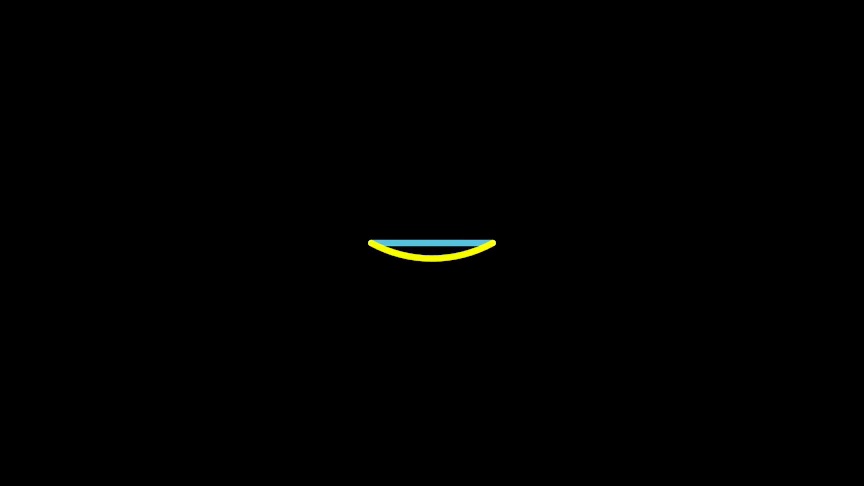
A straight line and an arc between the same two points:
Example: Example1Line 
from algan import *

Line(LEFT, RIGHT, color=BLUE).spawn()
Line(LEFT, RIGHT, path_arc=1.0, color=YELLOW).spawn()

Scene.save_video()
Methods
get_endget_lengthget_startget_unit_vectorget_vectorput_start_and_end_onColor the line by a function of
t, its progress from start to end.Attributes
animation_managerThis mob's scene-owned animation manager.
basisThe Mob's orientation and scale, as a flattened 3x3 matrix of shape
(*, 9).casts_shadowsWhether this Mob's geometry blocks light on its way from a light source to another surface -- whether it casts a shadow.
childrenThe Mobs attached below this one, in attachment order.
closed_shellWhether this Mob's triangles form a CLOSED shell -- every camera ray that enters the geometry crosses a second time on its way out.
draws_descendantsWhether
get_render_primitivesreturns geometry belonging to this Mob's DESCENDANTS as well as its own.forwardGet the direction the Mob is facing.
lifespanThis mob's [spawn, despawn) interval on its Scene timeline (a
Lifespan).locationThe Mob's position in world space, shape
(*, 3).normalized_basisThe Mob's orientation with scale divided out, shape
(*, 9).parentsThe Mobs this one is attached to, in attachment order.
receives_shadowsWhether this Mob's surfaces are darkened by shadows cast onto them.
rightGet the Mob's own rightward direction.
scale_coefficientThe Mob's scale along its own right, up and forward axes, shape
(*, 3).stroke_colorThe color of the circuit's border stroke.
two_sidedWhether this Mob's geometry should be lit from whichever side the ray arrives on.
upGet the Mob's own upward direction.
xThe Mob's x coordinate in world units, shape
(*, 1).xyThe Mob's x and y coordinates in world units, shape
(*, 2).yThe Mob's y coordinate in world units, shape
(*, 1).zThe Mob's z coordinate in world units, shape
(*, 1).z_indexWhich of two exactly coplanar circuits draws in front (higher wins).
- set_color_by_function(function)[source]
Color the line by a function of
t, its progress from start to end.The same as
BezierCircuitCubic.set_color_by_function, except that a line is one-dimensional: instead of(u, v)coordinates over a 2-D frame, the function is handed a singletrunning from 0 atget_start()to 1 atget_end(). A gradient along a line, or a value plotted onto one, is written directly in those terms.A line is unfilled, so this colors its stroke. The resolution is the line’s texture grid, which is one flat color unless you asked for more: build it with
grid_width(Line(LEFT, RIGHT, grid_width=64)). The height defaults to a single row across the line, sogrid_widthalone is the number of color samples along it.Animation
Recorded as an animation over the current context’s runtime (1 second by default), so the colors cross-fade smoothly. Wrap the call in
Off()to apply it instantly.- Parameters:
function – Callable taking a
ttensor of shape[..., 1], in[0, 1], and returning colors of shape[..., 3](RGB),[..., 4](RGBA) or[..., 5](RGB, glow, alpha – Algan’s internal channel order). Channels are in[0, 1]; a missing alpha defaults to 1 and a missing glow to 0. Must be vectorized – it is called once on the whole grid, not per texel.- Returns:
This line, so calls can be chained.
- Return type:
- Raises:
ValueError – If the line has a single-texel texture grid, or if
functionreturns the wrong number of colors.
Examples
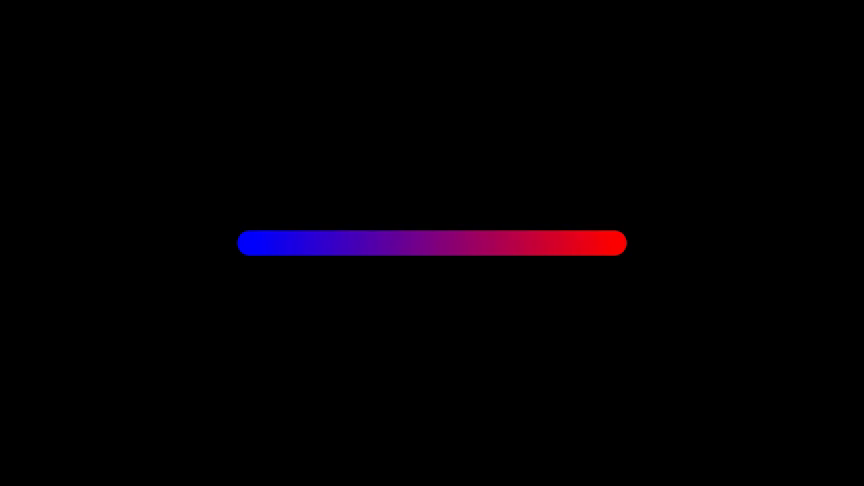
Example: Example1LineSetColorByFunction 
from algan import *
import torch

line = Line(LEFT * 3, RIGHT * 3, stroke_width=20, grid_width=64)
line.set_color_by_function(
    lambda t: torch.cat((t, torch.zeros_like(t), 1 - t), -1)
)
line.spawn()

Scene.save_video()