Contents Menu Expand Light mode Dark mode Auto light/dark, in light mode Auto light/dark, in dark mode Skip to content
Algan v0.0.2
Light Logo Dark Logo
Algan v0.0.2
  • Installation
  • Tutorials & Guides
    • New User Tutorials
      • Getting Started
      • Basic Animations
      • Combining Animations
      • Grouping Mobs
      • Updaters
      • Your First 3-D Scene
      • Where To Next
    • Galleries
      • The Mob Gallery
      • Built-in Animations
    • Advanced User Tutorials
      • Positioning and Layout
      • Bezier Curves and Circuits
      • Text and Mathematics
      • Importing From Manim
      • Cameras
      • Lighting and Shadows
      • Shaders and Materials
      • Reflections and Glass
      • Images and Textures
      • Importing 3-D Models
      • Backgrounds and Post-Processing
      • Transparent Backgrounds
      • Audio and Speech
      • Custom Animations
      • Animating Out of Order
      • Multi-Scene Projects
      • Performance and Quality
      • Renderer Limitations
      • Settings
      • Saving Videos and Images
      • The Render Daemon
      • Extending Algan
    • Manim Migration Guide
    • Developer Tutorials
      • An Overview of Algan’s Internals
  • Reference Manual
    • Scenes
      • scene
        • Scene
        • active_scene_method
      • scene_manager
        • SceneManager
      • render_loop
        • RenderLoopMixin
        • algan.render_loop.EmptySceneWarning
      • project
        • Project
      • daemon
      • viewer
        • ViewerHandle
      • session
        • ViewerSession
      • hierarchy
      • pixels
        • PixelRecord
    • Animation
      • animatable
        • Animatable
      • mob
        • Mob
      • mob_hierarchy
        • MobHierarchyMixin
      • mob_orientation
        • MobOrientationMixin
      • mob_movement
        • MobMovementMixin
      • mob_layout
        • MobLayoutMixin
      • mob_morph
        • MobMorphMixin
      • mob_materials
        • MobMaterialsMixin
      • animation_contexts
        • AnimationContext
        • AnimationManager
        • Audio
        • ComposedEasing
        • Lag
        • NoExtra
        • Off
        • OnInit
        • Seq
        • SlideShow
        • Speech
        • Sync
      • timeline
        • AnimationTimeline
        • AttributeTimeline
        • EditQueryIndex
        • EditRecord
        • FunctionApplicationEvent
        • FunctionTimeline
        • Lifespan
        • RowRanges
        • SegmentWindow
        • TimelineEvent
        • TimelineManager
        • TimelineSpan
        • UpdaterEvent
        • UpdaterSpan
      • manim_animations
      • movement
      • changing
        • AnimatedBoundary
      • indication
    • Core
      • errors
        • algan.errors.AlganConfigurationError
        • algan.errors.AlganError
        • algan.errors.AlganWarning
        • algan.errors.ApproximationWarning
        • algan.errors.AudioTranscriptMismatchError
        • algan.errors.ContextReuseError
        • algan.errors.DespawnedMobWarning
        • algan.errors.HierarchyChangedDuringUpdaterWarning
        • algan.errors.HierarchyError
        • algan.errors.InvalidColorError
        • algan.errors.LegacySceneDiscoveryWarning
        • algan.errors.ModifiedProtectedAttributeError
        • algan.errors.NeverSpawnedMobWarning
        • algan.errors.UnsupportedFeatureError
        • algan.errors.UnsupportedFeatureWarning
      • color
        • Color
      • material_presets
      • spatial
      • math
      • easings
      • geometry
      • logger
    • Mobs
      • group
        • Group
      • text
        • Code
        • MarkupText
        • Paragraph
        • Tex
        • TexTriangulated
        • Text
        • TextTriangulated
      • image_mob
        • ImageMob
      • image_compat
        • AbstractImageMobject
        • ImageMobject
        • ImageMobjectFromCamera
        • OpenGLImageMobject
      • manim_compat
        • Angle
        • AnnotationDot
        • AnnularSector
        • Annulus
        • Arc
        • ArcBetweenPoints
        • ArcBrace
        • ArcPolygon
        • ArcPolygonFromArcs
        • Arrow
        • Arrow3D
        • ArrowCircleFilledTip
        • ArrowCircleTip
        • ArrowSquareFilledTip
        • ArrowSquareTip
        • ArrowTip
        • ArrowTriangleFilledTip
        • ArrowTriangleTip
        • ArrowVectorField
        • Axes
        • BackgroundRectangle
        • BarChart
        • Brace
        • BraceBetweenPoints
        • BraceLabel
        • BraceText
        • BulletedList
        • Circle
        • Code
        • ComplexPlane
        • ComplexValueTracker
        • Cone
        • ConvexHull
        • ConvexHull3D
        • Cross
        • Cube
        • CubicBezier
        • CurvedArrow
        • CurvedDoubleArrow
        • CurvesAsSubmobjects
        • Cutout
        • Cylinder
        • DashedLine
        • DashedVMobject
        • DecimalMatrix
        • DecimalNumber
        • DecimalTable
        • DiGraph
        • Difference
        • Dodecahedron
        • Dot
        • Dot3D
        • DoubleArrow
        • Elbow
        • Ellipse
        • Exclusion
        • FullScreenRectangle
        • FunctionGraph
        • Graph
        • Group
        • Icosahedron
        • ImplicitFunction
        • Integer
        • IntegerMatrix
        • IntegerTable
        • Intersection
        • Label
        • LabeledArrow
        • LabeledDot
        • LabeledLine
        • LabeledPolygram
        • Line
        • Line3D
        • ManimBanner
        • ManimCompatMob
        • MarkupText
        • MathTable
        • MathTex
        • MathTexPart
        • Matrix
        • MobjectMatrix
        • MobjectTable
        • NumberLine
        • NumberPlane
        • Octahedron
        • OpenGLAnnularSector
        • OpenGLAnnulus
        • OpenGLArc
        • OpenGLArcBetweenPoints
        • OpenGLArrow
        • OpenGLArrowTip
        • OpenGLCircle
        • OpenGLCubicBezier
        • OpenGLCurvedArrow
        • OpenGLCurvedDoubleArrow
        • OpenGLCurvesAsSubmobjects
        • OpenGLDashedLine
        • OpenGLDashedVMobject
        • OpenGLDot
        • OpenGLDoubleArrow
        • OpenGLElbow
        • OpenGLEllipse
        • OpenGLGroup
        • OpenGLLine
        • OpenGLPoint
        • OpenGLPolygon
        • OpenGLRectangle
        • OpenGLRegularPolygon
        • OpenGLRoundedRectangle
        • OpenGLSector
        • OpenGLSquare
        • OpenGLTangentLine
        • OpenGLTipableVMobject
        • OpenGLTriangle
        • OpenGLVGroup
        • OpenGLVMobject
        • OpenGLVector
        • OpenGLVectorizedPoint
        • Paragraph
        • ParametricFunction
        • Point
        • PolarPlane
        • Polygon
        • Polygram
        • Polyhedron
        • Prism
        • Rectangle
        • RegularPolygon
        • RegularPolygram
        • RightAngle
        • RoundedRectangle
        • SVGMobject
        • SampleSpace
        • ScreenRectangle
        • Sector
        • SingleStringMathTex
        • Sphere
        • Square
        • Star
        • StealthTip
        • StreamLines
        • Surface
        • SurroundingRectangle
        • Table
        • TangentLine
        • TangentialArc
        • Tetrahedron
        • Tex
        • Text
        • ThreeDAxes
        • ThreeDVMobject
        • TipableVMobject
        • Title
        • Torus
        • Triangle
        • Underline
        • Union
        • UnitInterval
        • VDict
        • VGroup
        • VMobject
        • VMobjectFromSVGPath
        • ValueTracker
        • Variable
        • Vector
        • VectorField
        • VectorizedPoint
      • opengl_compat
        • OpenGLSurface
        • OpenGLSurfaceGroup
        • OpenGLSurfaceMesh
        • OpenGLTexturedSurface
      • bezier_circuit
        • BezierCircuitCubic
        • BezierCurveCubic
      • triangulated_bezier_circuit
        • TriangulatedBezierCircuit
      • shapes_2d
        • Circle
        • Dot
        • Line
        • Point
        • Polygon
        • Quad
        • QuadTriangulated
        • Rectangle
        • RegularPolygon
        • Square
        • SurroundingRectangle
        • Triangle
        • TriangleTriangulated
        • TriangleVertices
      • shapes_3d
        • Arrow3D
        • Cone
        • ConvexHull3D
        • Cube
        • Cylinder
        • Dodecahedron
        • Dot3D
        • Icosahedron
        • Line3D
        • Octahedron
        • Polyhedron
        • Prism
        • Sphere
        • Tetrahedron
        • Torus
      • point_cloud
        • DotCloud
        • Mobject1D
        • Mobject2D
        • OpenGLPGroup
        • OpenGLPMPoint
        • OpenGLPMobject
        • PGroup
        • PMobject
        • PointCloudDot
        • TrueDot
      • surface
        • Surface
      • procedural_textures
      • three_d_models
      • mesh
        • TriangleMesh
      • model_mob
        • Model3D
      • assimp_loader
      • gltf_loader
      • scene_data
        • AnimationData
        • MaterialData
        • MeshData
        • NodeAnimation
        • NodeData
        • SceneData
        • SkinData
      • manim_mob
        • ManimMob
      • numeric_display
        • DecimalNumber
    • Rendering
      • camera
        • Camera
      • lights
        • AmbientLight
        • DirectionalLight
        • HemisphereLight
        • Light
        • PointLight
        • RectAreaLight
        • SpotLight
      • materials
        • AdvancedPBRMaterial
        • DiffuseMaterial
        • ManimMaterial
        • Material
        • MeshBasicMaterial
        • MeshDepthMaterial
        • MeshLambertMaterial
        • MeshMatcapMaterial
        • MeshNormalMaterial
        • MeshPhongMaterial
        • MeshPhysicalMaterial
        • MeshStandardMaterial
        • MeshToonMaterial
        • PBRMaterial
        • Side
        • SpecularMaterial
        • UnlitMaterial
      • material_shaders
      • pbr_shaders
      • fragment_shaders
        • FragmentPipelineShader
        • FragmentStage
      • tracer
        • RenderPlan
      • raytracing
      • settings
      • truncation
        • TruncationCounts
      • denoise
      • primitive
        • RenderPrimitive
        • algan.rendering.primitives.primitive.OutOfRenderMemory
      • triangle_primitive
        • TrianglePrimitive
      • bezier_circuit_primitive
        • BezierCircuitPrimitive
      • post_processing
      • memory_model
        • AffineFrameCost
        • ChunkMemoryModel
        • PeakRatioModel
    • Settings
      • settings
      • abstract_settings
        • Settings
      • root_settings
        • AlganSettings
        • SettingsSnapshot
      • video_settings
        • VideoSettings
      • computing_settings
        • ComputingSettings
      • path_settings
        • PathSettings
      • style_settings
        • StyleSettings
      • raytracing_settings
        • RayTracingPreset
        • RayTracingSettings
    • Utilities
      • algan_utils
        • RenderResult
      • animation_utils
      • file_utils
      • memory_utils
        • AllocationRecorder
        • ManualMemory
        • ScopeRecord
        • TempMemoryContext
        • algan.utils.memory_utils.InsufficientMemoryException
      • mob_utils
        • BatchedMobViewSequence
      • manim_svg_cache
      • singleton
        • Singleton
      • tensor_utils
      • python_utils
      • audio_effect
        • AudioEffect
        • AudioManager
  • Frequently Asked Questions
    • FAQ: General Usage
  • Contributing
    • Development
  • Changelog
Back to top
View this page
Edit this page

The Mob Gallery

This is a tour of the Mobs Algan ships with. Every one of them is a Mob, so everything in Basic Animations applies to all of them: spawn them, move them, color them, morph them into each other.

The complete list, with every constructor argument, is in the mobs reference.

2-D Shapes

Algan’s 2-D shapes are cubic Bezier circuits (BezierCircuitCubic), which means they stay perfectly smooth however far you zoom in. A Circle is a real circle, not a many-sided polygon.

Example: GalleryShapes2D 

from algan import *

shapes = Group([
    Circle(), Square(), Triangle(), RegularPolygon(6),
    Rectangle(width=1.4, height=0.8), Line(LEFT * 0.5, RIGHT * 0.5),
    Dot(), Point(),
])
shapes.arrange_in_grid(2, row_buffer=0.9).scale(0.7).spawn()
shapes.wait()

Scene.save_video()

Class

Notes

Circle

radius.

Dot

A small filled circle, for marking points.

Square

size.

Rectangle

width, height.

RegularPolygon

n sides. Triangle is RegularPolygon(3).

Polygon

An arbitrary closed outline through the points you give it.

Quad

A four-cornered shape from four explicit corners.

Line

From a start point to an end point.

Point

A single point; mostly useful as an invisible anchor.

SurroundingRectangle

A box drawn around another Mob, sized to fit it.

All of them take color, plus stroke_width and stroke_color for their outline:

Example: GalleryBorders 

from algan import *

with Off():
    Group([Circle(color=BLUE, stroke_color=WHITE, stroke_width=w).scale(0.8)
           for w in (0, 4, 16)]).arrange_in_line(RIGHT, buffer=0.4).spawn()

Scene.wait(1)

Scene.save_video()

On a filled shape the border is drawn inside the outline, so raising stroke_width eats into the fill instead of growing the silhouette. This makes bordered text stay legible and neighbouring glyphs never fuse. An unfilled shape (filled=False, and Line) has no interior to eat into, so its stroke stays centred on the path.

More 2-D shapes from the compatibility layer

A second family of outline shapes comes from Algan’s Manim compatibility layer (see Importing From Manim). They spawn, move and animate like any other Mob, but they are constructed with Manim’s arguments:

Class

Notes

Arc

Sized with radius, start_angle, and angle.

Annulus

A ring defined by inner_radius and outer_radius.

Ellipse

Sized with width and height.

Star

Defined by n points, outer_radius, and inner_radius.

Arrow

An arrow from a start point to an end point, with a customizable head.

These come from the Manim compatibility layer, but they take the same stroke_width and stroke_color in the same units as the native shapes above – algan.manim is where Manim’s own (double) stroke unit lives:

Example: GalleryCompatShapes 

from algan import *

with Off():
    Group([
        Arc(radius=1, start_angle=0, angle=180),
        Annulus(inner_radius=0.5, outer_radius=1.0),
        Ellipse(width=2, height=1.2),
        Star(n=6, color=BLUE, stroke_color=WHITE, stroke_width=2),
        Arrow(start=LEFT, end=RIGHT),
    ]).arrange_in_line(RIGHT, buffer=0.4).scale(0.8).spawn()

Scene.wait(1)

Scene.save_video()

3-D Shapes

3-D shapes are triangle meshes, and they come in two families that differ in how Algan turns them into triangles.

  • Curved shapes: Built on Surface. These are tessellated dynamically so they stay smooth even when the camera moves close.

  • Faceted polyhedra: Flat-sided solids built from explicit polygon faces.

Example: GalleryShapes3D 

from algan import *

shapes = Group([
    Sphere(radius=0.45), Cube(size=0.75), Cylinder(radius=0.35, height=0.8),
    Cone(radius=0.45, height=0.8), Torus(ring_radius=0.55, tube_radius=0.2),
    Tetrahedron(edge_length=1.0), Octahedron(edge_length=0.6),
    Icosahedron(edge_length=0.5),
])
shapes.arrange_in_grid(2, row_buffer=0.6).spawn()
shapes.wait()

Scene.save_video()

Curved 3-D Shapes:

Class

Notes

Sphere

Sized with radius.

Cylinder

Sized with radius, height, and direction.

Cone

Sized with radius, height, and direction.

Torus

Sized with ring_radius and tube_radius.

Dot3D, Line3D

A small 3-D sphere and cylinder for marking points and 3-D segments.

Arrow3D

A 3-D arrow combining a cylinder shaft and cone tip.

Faceted 3-D Shapes:

Class

Notes

Cube

Sized with size.

Prism

A 3-D box sized with width / height / depth. Great for walls, pedestals, or floors.

Tetrahedron, Octahedron, Icosahedron, Dodecahedron

Platonic solids sized with edge_length.

Polyhedron, ConvexHull3D

Custom 3-D solids constructed from your own vertices and faces, or point clouds.

Unlike 2-D shapes, 3-D shapes respond to light. See Your First 3-D Scene to get started and Lighting and Shadows for the full lighting model.

Parametric Surfaces

Surface lets you build any custom curved 3-D surface by defining a function that maps 2-D coordinates (u, v) in [0, 1] to 3-D points in space:

Example: GallerySurface 
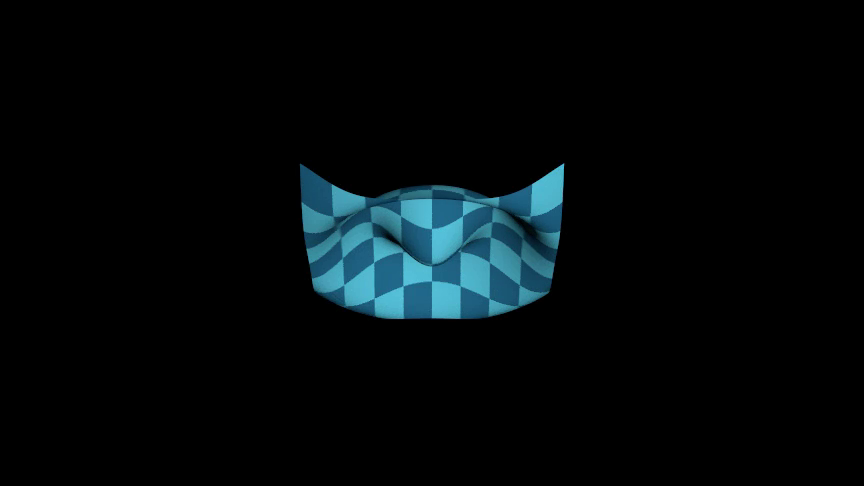
../_images/GallerySurface-1.png
from algan import *
import torch

def ripple(uv):
    x = uv[..., :1] * 4 - 2
    y = uv[..., 1:] * 4 - 2
    return torch.cat((x, y, torch.cos(torch.sqrt(x ** 2 + y ** 2) * 3) * 0.4), -1)

checker = get_checkerboard((BLUE, BLUE_E))
Surface(ripple, color_texture=checker).rotate(60, RIGHT).spawn()

Scene.save_video()

The function receives a batched tensor of (u, v) pairs and must return the matching points, so write it with torch operations rather than a Python loop. Your First 3-D Scene works through this in more detail, and Surface also accepts texture maps – see Images and Textures.

Text and Mathematics

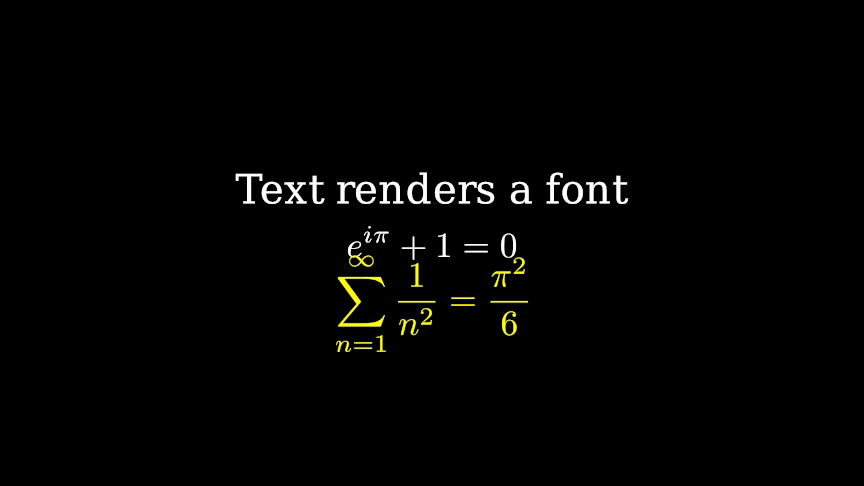
Text renders a string with a font; Tex and MathTex render LaTeX. Both are cubic Bezier circuits, so they scale and morph like any other 2-D shape.

Example: GalleryText 
../_images/GalleryText-1.png
from algan import *

with Off():
    Text("Text renders a font", font_size=48).move(UP * 0.9).spawn()
    Tex(r"e^{i\pi} + 1 = 0", font_size=56).spawn()
    MathTex(r"\sum_{n=1}^{\infty} \frac{1}{n^2} = \frac{\pi^2}{6}",
            font_size=56, color=YELLOW).move(DOWN * 1.0).spawn()

Scene.wait(1)

Scene.save_video()

Text and Mathematics covers these properly, including per-glyph animation and the hand-writing effect.

Images and Imported Models

Class

Notes

ImageMob

An image file or RGBA array as a flat, textured surface.

Model3D

A .glb / .gltf / .fbx model, with its materials and rigid node animation.

ManimMob

Any Manim Mobject, converted to Algan geometry.

DotCloud

A large set of points, drawn efficiently.

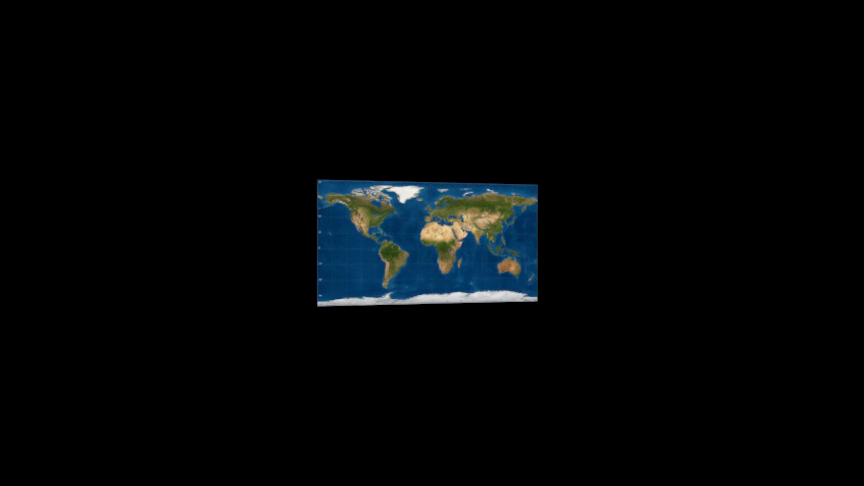
Example: GalleryImageMob 

../_images/GalleryImageMob-1.png
from algan import *

ImageMob('world_map.png').scale(2).rotate(25, UP).spawn()

Scene.save_video()

Image paths are resolved against the working directory and then against the directory holding your script, so an image sitting beside your .py file loads no matter where you launch Python from. See Images and Textures and Importing 3-D Models.

Diagrams and Plots

Coordinate axes, function graphs, bar charts, and data tables come from Algan’s Manim compatibility layer. They animate as standard Algan Mobs:

Example: GalleryAxes 

from algan import *
import numpy as np

axes = Axes(x_range=(-3, 3, 1), y_range=(-1.5, 1.5, 0.5), x_length=9, y_length=4.5)
graph = axes.plot(lambda x: np.sin(x), color=YELLOW)
with Off():
    axes.spawn()
    graph.spawn()

with Seq(runtime=2):
    graph.rotate(20, UP)
    graph.rotate(-20, UP)

Scene.save_video()

Axes, NumberPlane, NumberLine, BarChart, Table, Brace and Graph are all available. They keep their Manim constructor arguments and methods (axes.plot, axes.c2p, axes.add_coordinates()), and what those methods return is itself an Algan Mob you can spawn and animate independently.

Importing From Manim covers this, and the route for anything the compatibility layer does not expose.

Grouping

Group collects Mobs so you can move, scale and color them as one, and provides arrange_in_line() and arrange_in_grid() for layout. See Grouping Mobs.

Animated Numbers

DecimalNumber shows a number you can animate, counting smoothly between values:

Example: GalleryDecimalNumber 

from algan import *

counter = DecimalNumber(0.0, decimal_places=1,
                         integer_places=3).scale(2).spawn()
counter.value = 99.9

Scene.save_video()

Text and Mathematics shows it counting over a longer run and covers the formatting options.

Where To Next

  • Built-in Animations – the ready-made animations to apply to these shapes.

  • Positioning and Layout – getting these shapes where you want them.

  • Text and Mathematics – labels, formulae and animated numbers in full.

  • Your First 3-D Scene – lighting, cameras and surfaces for the 3-D shapes.

  • Importing From Manim – axes, plots and the rest of the compatibility layer.

  • Shaders and Materials – how the 3-D shapes respond to light.

  • Extending Algan – building a shape of your own, and packing thousands of them into one Mob.

Next
Built-in Animations
Previous
Galleries
Copyright © 2025-2026, Algorithmic Simplicity
Made with Sphinx and @pradyunsg's Furo
On this page
  • The Mob Gallery
    • 2-D Shapes
      • More 2-D shapes from the compatibility layer
    • 3-D Shapes
    • Parametric Surfaces
    • Text and Mathematics
    • Images and Imported Models
    • Diagrams and Plots
    • Grouping
    • Animated Numbers
    • Where To Next