Bezier Curves and Circuits
Every 2-D shape Algan draws is a cubic bezier circuit: a chain of cubic
bezier segments stored as control points and evaluated analytically by the
renderer rather than chopped into line segments. That is why a
Circle is a real circle at any zoom, why a glyph
of Text stays crisp, and why any of them can
become() any other.
Two classes give you that machinery directly:
Class |
What it is |
|---|---|
An open path – a stroke with no interior. The control points need not close, and need not lie in a plane, so this is the class for a 3-D curve. |
|
The same geometry with a fill. The base class of every 2-D shape, and the one to reach for when you want an interior, holes, or a texture grid. |
You need them when the shape you want is not one Algan ships with: a parametric curve in space, a knot, a field line, a hand-authored logo. If the shape is one Algan ships with, use that instead – see The Mob Gallery.
Control points
A cubic bezier segment is four points: it starts at P0, ends at P3, and
P1 and P2 are handles that pull the curve away from the straight line
between them without ever being touched by it.
Example: BezierOneSegment 
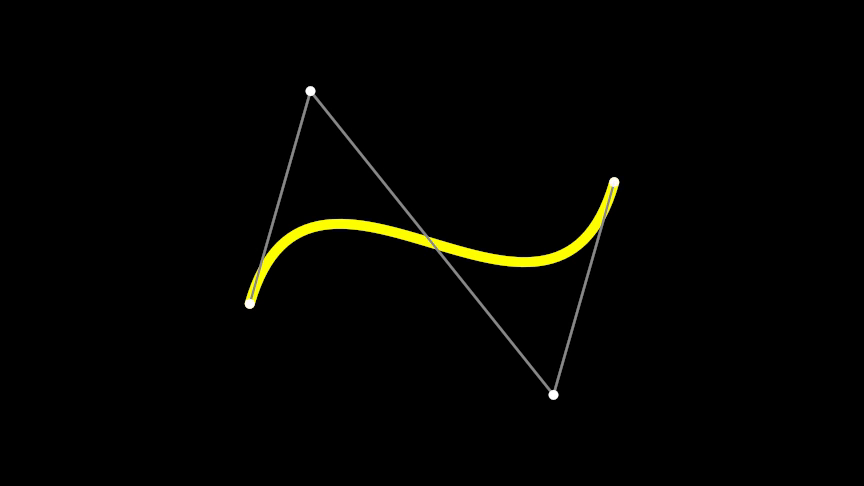
from algan import *
import torch

points = torch.tensor([
    [-3.0, -1.0, 0.0],   # P0 -- where the curve starts
    [-2.0,  2.5, 0.0],   # P1 -- the handle leaving P0
    [ 2.0, -2.5, 0.0],   # P2 -- the handle arriving at P3
    [ 3.0,  1.0, 0.0],   # P3 -- where it ends
])

BezierCurveCubic(points, color=YELLOW, stroke_width=8).spawn()

for start, end in zip(points[:-1], points[1:]):
    Line(start, end, color=GRAY, stroke_width=2).spawn()
for point in points:
    Dot(point, color=WHITE).spawn()

Scene.save_video()
control_points is the first argument of both classes – give everything else
by keyword. It is a (*, 3) tensor, or any nested sequence a list of lists
included, read in groups of four: one group per segment, in world units.
Joining segments
A segment that starts exactly where the previous one ended continues the same path. A segment that starts anywhere else begins a new sub-path, which is how one circuit carries several strokes, or a shape carries a hole.
Example: BezierJoinedSegments 
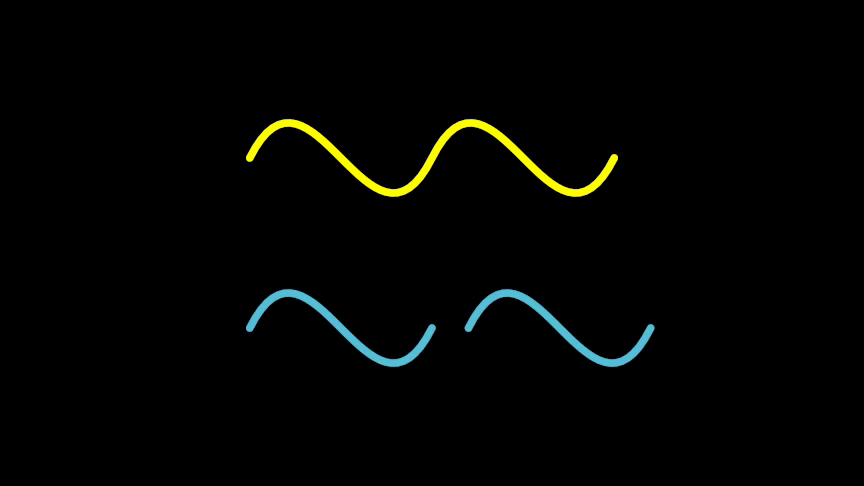
from algan import *
import torch

joined = torch.tensor([
    [-3.0, 0.0, 0.0], [-2.0, 2.0, 0.0], [-1.0, -2.0, 0.0], [0.0, 0.0, 0.0],
    [ 0.0, 0.0, 0.0], [ 1.0, 2.0, 0.0], [ 2.0, -2.0, 0.0], [3.0, 0.0, 0.0],
])
BezierCurveCubic(joined, color=YELLOW, stroke_width=6).move(UP * 1.4).spawn()

# The same points, with the second segment nudged off the first one's end.
split = joined.clone()
split[4:] += torch.tensor([0.6, 0.0, 0.0])
BezierCurveCubic(split, color=BLUE, stroke_width=6).move(DOWN * 1.4).spawn()

Scene.save_video()
The join is decided by position alone, to within 1e-5 world units. Two segments
that meet share a point but not a tangent unless you make them: for a smooth
corner, put the incoming P2, the shared point and the outgoing P1 on one
straight line, at equal distances for equal speed.
Important
The control-point count should be a multiple of four. A trailing partial group is dropped without a warning, so 6 points draw one segment and lose two points rather than raising.
Building a path from a function
Most curves worth drawing are parametric, and a cubic segment matches one exactly if you give it the function’s own endpoints and tangents. This helper is used by the rest of this page:
def cubic_path(f, df, segments):
    """Control points for a smooth path along ``f``, whose derivative is ``df``."""
    points = []
    for i in range(segments):
        a, b = i / segments, (i + 1) / segments
        h = (b - a) / 3
        p0, p3 = f(a), f(b)
        points += [p0, p0 + df(a) * h, p3 - df(b) * h, p3]
    return torch.stack(points)
segments is the only accuracy knob you own: a cubic holds about a quarter
turn before the error shows, so 8 segments per full revolution is a good default
and 16 is indistinguishable. Nothing downstream refines your approximation of
f – the cubics you hand in are the curve, and the renderer’s own sampling
only resolves those cubics to sub-pixel accuracy.
Open paths: BezierCurveCubic
BezierCurveCubic is BezierCircuitCubic with filled
pinned to False. Everything else is inherited, and two things follow from
having no interior:
The color you set is the stroke’s.
coloron a circuit means fill, and there is no fill here, socolorstands in forstroke_color– the same readingLinegives it. Passing both keepsstroke_color. Passingfilled=Trueraises.The stroke is centred on the path, rather than laid inward from an outline the way a filled shape’s border is. See Closed shapes: BezierCircuitCubic below.
Argument |
Meaning |
|---|---|
|
The path, |
|
The stroke’s color. Defaults to |
|
Stroke width in pixels, measured against |
|
Resolution of the color grid laid across the curve. Both default to |
|
Per-control-point normals for lighting, |
|
Tie-break between exactly coplanar circuits; higher draws in front.
Defaults to |
|
Make it invisible, for a path that exists only to be morphed into or to
position something. Defaults to |
|
Where to put the finished path, |
Color along a curve
A circuit carries a rectangular grid of color samples across its own frame, which
the renderer interpolates per fragment. It is a single sample by default, so ask
for a grid and fill it in with
set_color_by_function():
Example: BezierGradientAlongCurve 
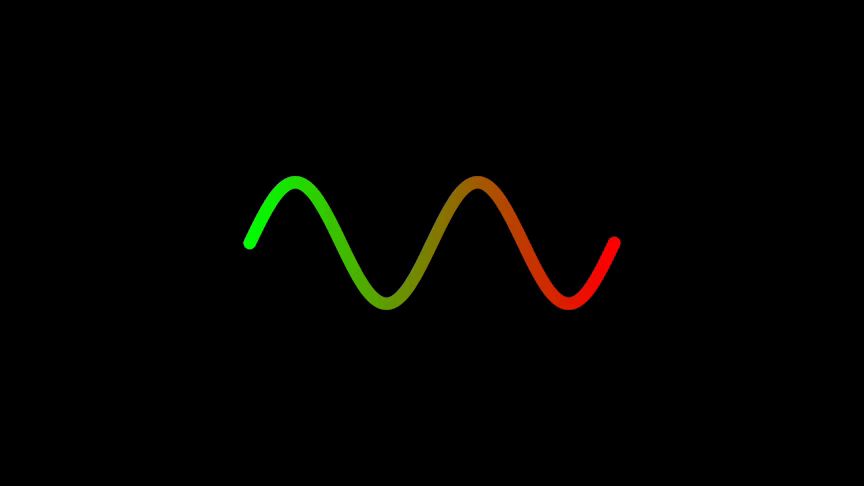
from algan import *
import math
import torch

def cubic_path(f, df, segments):
    points = []
    for i in range(segments):
        a, b = i / segments, (i + 1) / segments
        h = (b - a) / 3
        p0, p3 = f(a), f(b)
        points += [p0, p0 + df(a) * h, p3 - df(b) * h, p3]
    return torch.stack(points)

wave = BezierCurveCubic(
    cubic_path(
        lambda t: torch.tensor([6 * (t - 0.5), math.sin(4 * math.pi * t), 0.0]),
        lambda t: torch.tensor([6.0, math.cos(4 * math.pi * t) * 4 * math.pi, 0.0]),
        segments=16,
    ),
    stroke_width=10,
    grid_width=64,
    grid_height=1,
)
wave.set_color_by_function(
    lambda uv: torch.cat(
        (uv[..., :1], 1 - uv[..., :1], torch.zeros_like(uv[..., :1])), -1
    )
)
wave.spawn()

Scene.save_video()
grid_height=1 is the right shape for a curve that runs left to right: u
varies along the first basis row and one sample across is all a stroke needs. The
grid spans the square that circumscribes the path, not the path itself, so a
gradient has already run through part of its range before the stroke starts –
Images and Textures covers the (u, v) domain in full, and
set_color_by_image() paints a picture on instead.
Note
A Line parametrizes the same call by a single
t running from its start to its end, which is usually what you want on a
straight segment.
Curves in three dimensions
An open path bounds no surface, so nothing about a
BezierCurveCubic requires its control points to be coplanar. Give it
a curve that leaves its plane and you get a real 3-D curve – it keeps its
position in space, foreshortens correctly, and passes in front of and behind
whatever else is in the scene:
Example: BezierHelix3D 
from algan import *
import math
import torch

def cubic_path(f, df, segments):
    points = []
    for i in range(segments):
        a, b = i / segments, (i + 1) / segments
        h = (b - a) / 3
        p0, p3 = f(a), f(b)
        points += [p0, p0 + df(a) * h, p3 - df(b) * h, p3]
    return torch.stack(points)

turn = 3 * 2 * math.pi
helix = BezierCurveCubic(
    cubic_path(
        lambda t: torch.tensor(
            [4 * (t - 0.5), math.cos(turn * t), math.sin(turn * t)]
        ),
        lambda t: torch.tensor(
            [4.0, -math.sin(turn * t) * turn, math.cos(turn * t) * turn]
        ),
        segments=24,
    ),
    color=YELLOW,
    stroke_width=6,
)
with Off():
    helix.spawn()
helix.draw()
helix.rotate(90, UP)

Scene.save_video()
How a 3-D curve is drawn
A planar circuit is resolved by intersecting a camera ray with the circuit’s own plane and deciding coverage analytically there. A path that is not in a plane cannot be resolved that way, so Algan classifies every circuit once, when you construct it, and an unfilled non-planar one is split into maximal near-straight runs, each drawn as its own circuit turned to face the camera about that run’s own axis.
The result is a curve that sits where you put it in space while its stroke keeps the constant screen-space width every other circuit’s does – which is what a line drawing wants, and what a swept 3-D tube would not give you. What comes out is ordinary geometry, so shadows, reflections and refraction see the same curve the camera does.
Three consequences are worth knowing before you build a scene around one:
The verdict is fixed at construction, exactly as the circuit’s plane is. A flat curve you later
becomeinto a helix stays flat, and the reverse holds too. Construct the curve with the geometry it will need.The color grid collapses to one flat color. The grid is laid across a circuit’s plane frame, and a split stroke no longer has one, so
set_color_by_function()and color waves come out as a single average color on a 3-D curve. Give the curve one color, or build it as several curves that each carry their own.It renders on its own, outside the batched circuit pack that planar shapes share. A scene with many 3-D curves costs more than the same number of flat ones – see Performance and Quality.
Bezier outlines that are not flat in Renderer Limitations documents the classifier
itself, including the filled case (which becomes curved patches instead) and the
ALGAN_NONPLANAR_CIRCUITS=0 escape hatch that restores the old
flatten-everything behaviour.
Closed shapes: BezierCircuitCubic
Give the same control points to BezierCircuitCubic and the region they
enclose is painted. color is now the fill and stroke_color the border,
and they are independent – setting one never touches the other.
The border of a filled circuit is drawn inside the outline, so raising
stroke_width eats into the fill instead of growing the silhouette. That is
what keeps bordered text legible and stops neighbouring glyphs fusing. An
unfilled path has no interior to eat into, so its stroke is centred and half of
it lies outside the path:
Example: BezierFillAndStroke 
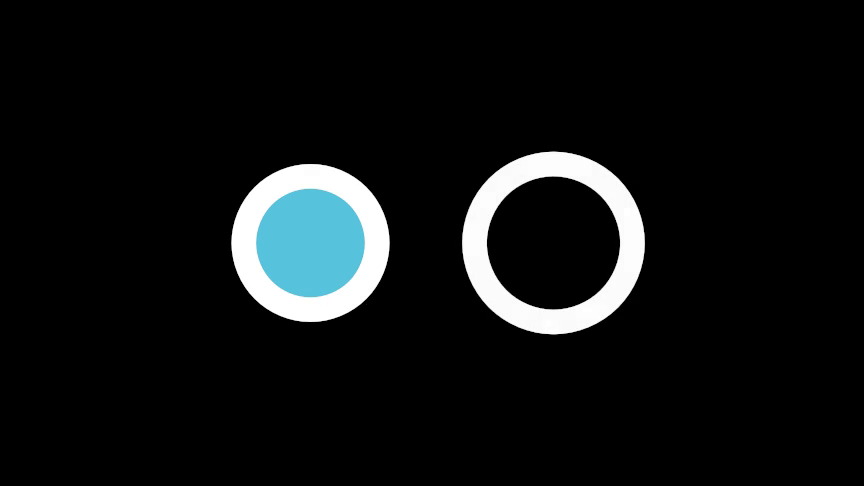
from algan import *
import math
import torch

def cubic_path(f, df, segments):
    points = []
    for i in range(segments):
        a, b = i / segments, (i + 1) / segments
        h = (b - a) / 3
        p0, p3 = f(a), f(b)
        points += [p0, p0 + df(a) * h, p3 - df(b) * h, p3]
    return torch.stack(points)

def ring(radius, segments=8):
    turn = 2 * math.pi
    return cubic_path(
        lambda t: radius * torch.tensor(
            [math.cos(turn * t), math.sin(turn * t), 0.0]
        ),
        lambda t: radius * turn * torch.tensor(
            [-math.sin(turn * t), math.cos(turn * t), 0.0]
        ),
        segments,
    )

path = ring(1.3)
BezierCircuitCubic(
    path, color=BLUE, stroke_color=WHITE, stroke_width=20, location=LEFT * 2
).spawn()
BezierCurveCubic(
    path, color=WHITE, stroke_width=20, location=RIGHT * 2
).spawn()

Scene.save_video()
SETTINGS.style.set(border_placement="centered") switches the filled case to
centred placement globally, which is the Manim and SVG convention – see
Settings.
Holes
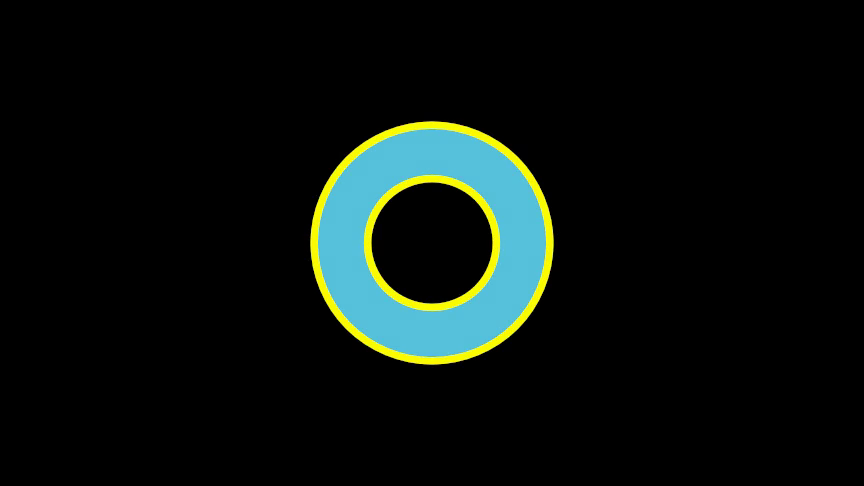
A sub-path that starts somewhere other than the previous one’s end encloses its own region, and a region enclosed twice is a hole. This is the even-odd rule that carves the counter out of an “o”:
Example: BezierCircuitHole 
from algan import *
import math
import torch

def cubic_path(f, df, segments):
    points = []
    for i in range(segments):
        a, b = i / segments, (i + 1) / segments
        h = (b - a) / 3
        p0, p3 = f(a), f(b)
        points += [p0, p0 + df(a) * h, p3 - df(b) * h, p3]
    return torch.stack(points)

def ring(radius, segments=8):
    turn = 2 * math.pi
    return cubic_path(
        lambda t: radius * torch.tensor(
            [math.cos(turn * t), math.sin(turn * t), 0.0]
        ),
        lambda t: radius * turn * torch.tensor(
            [-math.sin(turn * t), math.cos(turn * t), 0.0]
        ),
        segments,
    )

BezierCircuitCubic(
    torch.cat((ring(2.0), ring(1.0))),
    color=BLUE,
    stroke_color=YELLOW,
    stroke_width=6,
).spawn()

Scene.save_video()
Winding direction does not matter – both rings above run the same way. The border is drawn on every sub-path, so the hole gets an outline too.
Warning
The even-odd rule applies to planar circuits only. A filled circuit whose sub-paths are not coplanar becomes curved patches, one group per sub-path, and its holes are filled. See Bezier outlines that are not flat.
Where a circuit sits and turns
A circuit derives a local frame from its control points once, at construction:
Its
locationis the centroid of the region it encloses, not the middle of its bounding box, so aTrianglespins about itself rather than orbiting a point above itself. An open path that encloses no area falls back to the arc-length centroid of the path.Its two in-plane basis rows are aligned to the world axes and share a length, so
circuit.scale([4, 1, 1])stretches along the shape’s own right and up rather than along a diagonal. A straight, collinear path is the exception: it has no plane, so its first row points from its centre toward its start.Its third row is the plane normal, oriented to face the viewer.
z_index breaks ties between circuits that are exactly coplanar – a label
over a panel, a highlight over the shape it marks. Setting it propagates to the
whole sub-hierarchy. It is spent as a bias of a few ten-thousandths of a world
unit, so it settles a tie and nothing more; it will not pull a shape in front of
something genuinely ahead of it.
Animating a circuit
A circuit is an ordinary Mob, so everything
in Basic Animations applies. Two things are its own:
draw()Reveals the path from its start to a fraction
tof the way round, as though traced by a pen, and leaves the circuit with exactly the geometry it started with. It captures the current control points as the full path, so call it on a finished shape – do not collapse the shape first.become()Interpolates control points directly, which is why any circuit can morph into any other.
filledandemptycannot be interpolated, so a pair that differs in either cross-fades instead.
curve = BezierCurveCubic(points, color=YELLOW).spawn()

curve.draw()                       # trace it on over 1 second
with Seq(runtime=2):
    curve.rotate(360, UP)          # a 3-D curve turns in space
curve.become(other_curve)          # morph into another path
curve.stroke_color = BLUE          # cross-fade the stroke
stroke_width and stroke_color are animatable attributes like any other.
z_index, filled and empty are not: they select between discrete
states and take effect immediately.
Note
A shape built from many circuits – a Text, a
Tex – packs them into one Mob with
from_batches() rather than one Mob per glyph, so
the whole thing animates as a single batch. Reach for it if you are building
a composite of your own out of many independent circuits.
Troubleshooting
Symptom |
Likely cause |
|---|---|
A filled shape’s border ignores |
Expected: |
Nothing appears |
|
Part of the path is missing |
The control-point count is not a multiple of four, and the tail was dropped. |
The path is broken into pieces |
A segment does not start exactly where the previous one ends, so it began a new sub-path. |
A 3-D curve renders flat |
Its control points were coplanar when it was constructed, or
|
A gradient on a 3-D curve comes out one flat color |
Expected: the color grid needs a plane. Split it into several curves. |
A corner is sharp where it should be smooth |
The handles either side of the shared point are not collinear with it. |
A filled shape’s silhouette does not grow with |
Expected: a filled circuit’s border is drawn inside its outline. |
See Also
The Mob Gallery – the shapes built on these two classes, which are usually what you want instead of building one by hand.
Images and Textures – the
(u, v)grid in full, and painting an image across a shape.Renderer Limitations – Bezier outlines that are not flat for the classifier, and Ordering, coplanar geometry and z-fighting for how coplanar geometry is ordered.
Importing From Manim – Manim’s
VMobjectgeometry is the same cubic bezier data, and imports as circuits.Text and Mathematics – text, whose glyphs are circuits packed with
from_batches.Extending Algan – subclassing
BezierCircuitCubicto make a shape of your own.