BezierCircuitCubic
Qualified name: algan.mobs.bezier\_circuit.BezierCircuitCubic
- class BezierCircuitCubic(control_points, normals=None, stroke_width=5, stroke_color=Color([1., 1., 1., 0., 1.]), filled=True, add_texture_grid=True, grid_width=1, grid_height=None, empty=False, z_index=0, shade_in_3d=False, **kwargs)[source]
Bases:
MobA closed loop of cubic bezier curves – the geometry every 2-D shape is made of.
The curves are evaluated analytically by the renderer rather than tessellated, so a circuit stays exactly smooth at any zoom, and any circuit can
become()any other. On a filled circuit the border is drawn inside the outline, so raisingstroke_widtheats into the fill instead of growing the silhouette; an unfilled circuit has no interior to eat into, so its stroke stays centred on the path.Color across a circuit. A circuit carries a rectangular grid of colored points, laid across its own frame and sampled bilinearly per fragment by the renderer.
grid_widthxgrid_heightis therefore the resolution of everything painted on the shape – a gradient, an image, a color wave – and it defaults to a single point, i.e. one flat color. Raise it and fill it in withset_color_by_function()orset_color_by_image().This grid is the counterpart of
Surface.grid, and shares its name deliberately. ASurfacekeeps its vertex colors and its texture maps apart because a curved surface wants geometry and image detail at different resolutions; a circuit is always flat, so the distinction buys it nothing and one grid serves as both.The grid’s
(u, v)domain is the circuit’s own frame, exactly asSurface’s is:uruns from 0 to 1 along the first basis row andvalong the second, which for an upright 2-D shape meansuleft to right andvbottom to top. Both rows are as long as the distance from the centre to the furthest control point, so the frame spans the square that circumscribes the shape and the shape itself covers the middle of the domain rather than all of it.- Parameters:
control_points – The cubic bezier control points, shape
(*, 3)in world units, in groups of four:P0, P1, P2, P3per segment, with each segment starting where the previous one ended. A segment that starts somewhere else begins a new sub-circuit, which is how a shape gets holes.normals – Per-control-point normals, shape
(*, 3), used for lighting. Defaults toNone, meaning the circuit’s own plane normal is used.stroke_width – Width of the border stroke, in pixels against
PREVIEW’s frame height (396): the renderer scales it by its own frame height over that, so a border keeps its apparent weight at any resolution. Defaults to5; pass0for no border.stroke_color – Color of the border stroke. Defaults to
WHITE. The circuit’scoloris its fill color and does not touch the border; seestroke_color.filled – Whether the interior is painted. Defaults to
True;Falseleaves an outline whose stroke is centred on the path (whatLineuses).add_texture_grid – Whether to build the texture grid at all. Defaults to
True.Falseleaves the circuit one color and no per-texel storage, and theset_color_by_*methods then have nothing to write to.grid_width – Number of color samples along the circuit’s first basis row –
u, left to right on an upright shape. Defaults to1: one flat color, which is what a shape wants unless you are painting something across it.grid_height – Number of color samples along the second basis row (
v). Defaults toNone, meaning matchgrid_width– except on a circuit whose control points are collinear (a straightLine), where the second row is synthesized perpendicular to the path and carries no extent of the shape, so it defaults to1and the grid runs along the line only.empty – Whether the circuit is invisible: fill and border are forced to zero opacity. Defaults to
False. Used for shapes that exist only to position or morph into something else.z_index –
Which of two exactly coplanar circuits draws in front: the higher
z_indexwins. Defaults to0, which leaves the shape in author order – coplanar 2-D geometry draws in the order it was created, each composite Mob kept whole and drawn parent-first, so an arrow crossing a grid authored before it lands on top of that grid without being asked to. Raise it to override that: a label over a panel authored after it, a highlight over the shape it marks. Setting it propagates to the whole sub-hierarchy (seez_index).It is not a general depth override. The renderer spends it as a bias of a few ten-thousandths of a world unit toward the camera – enough to settle a tie between surfaces at the same depth, far too little to reorder anything genuinely in front of or behind. Values are small integers; a few hundred would start to shift the shape visibly. Matches Manim’s attribute of the same name, both in meaning and in being a stable sort key over the authored order, and
ManimMobcarries it across on import.**kwargs – Passed to
Mob– notablycolor, which is the fill color.locationis the exception: a circuit’s own is derived from the control points (the centroid of the region they enclose, so the shape turns about itself), so one given here is applied as a move onto that point once the frame has been derived, rather than replacing it.
See also
set_color_by_function()Color it by a function of
(u, v).set_color_by_image()Paint an image across it.
SurfaceThe 3-D counterpart, with the same
(u, v)conventions.
Examples
Example: Example1BezierCircuitCubic 
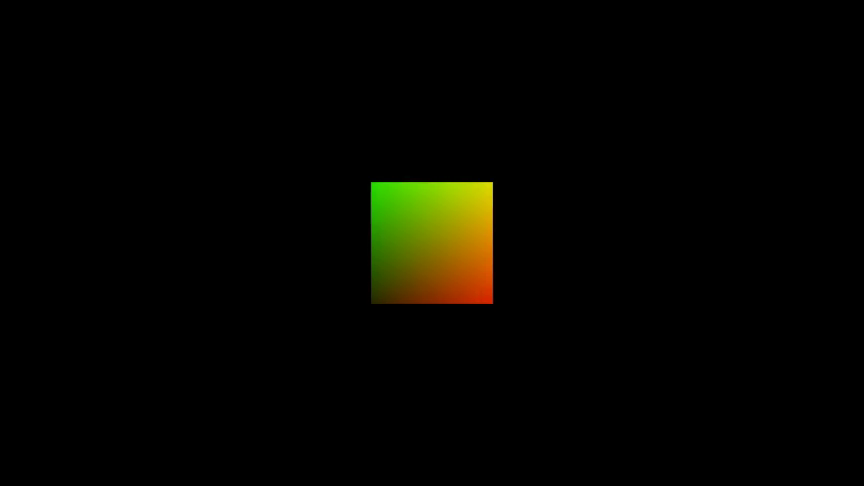
from algan import *
import torch

square = Square(grid_width=32, grid_height=32, stroke_width=0)
square.set_color_by_function(
    lambda uv: torch.cat(
        (uv[..., :1], uv[..., 1:], torch.zeros_like(uv[..., :1])), -1
    )
)
square.spawn()

Scene.save_video()
Methods
Draw the circuit on, as though traced by a pen.
Build many independently indexable circuits without per-circuit mobs.
get_animatable_attrsGet the circuit's texture grid, the
(u, v)domain it is colored over.Get the color a circuit uses when none was given.
get_render_primitivesColor the circuit by a function of its
(u, v)parameters.Paint an image across the circuit.
Attributes
animation_managerThis mob's scene-owned animation manager.
basisThe Mob's orientation and scale, as a flattened 3x3 matrix of shape
(*, 9).casts_shadowsWhether this Mob's geometry blocks light on its way from a light source to another surface -- whether it casts a shadow.
childrenThe Mobs attached below this one, in attachment order.
closed_shellWhether this Mob's triangles form a CLOSED shell -- every camera ray that enters the geometry crosses a second time on its way out.
draws_descendantsWhether
get_render_primitivesreturns geometry belonging to this Mob's DESCENDANTS as well as its own.forwardGet the direction the Mob is facing.
lifespanThis mob's [spawn, despawn) interval on its Scene timeline (a
Lifespan).locationThe Mob's position in world space, shape
(*, 3).normalized_basisThe Mob's orientation with scale divided out, shape
(*, 9).parentsThe Mobs this one is attached to, in attachment order.
receives_shadowsWhether this Mob's surfaces are darkened by shadows cast onto them.
rightGet the Mob's own rightward direction.
scale_coefficientThe Mob's scale along its own right, up and forward axes, shape
(*, 3).The color of the circuit's border stroke.
two_sidedWhether this Mob's geometry should be lit from whichever side the ray arrives on.
upGet the Mob's own upward direction.
xThe Mob's x coordinate in world units, shape
(*, 1).xyThe Mob's x and y coordinates in world units, shape
(*, 2).yThe Mob's y coordinate in world units, shape
(*, 1).zThe Mob's z coordinate in world units, shape
(*, 1).Which of two exactly coplanar circuits draws in front (higher wins).
- draw(t=1.0)[source]
Draw the circuit on, as though traced by a pen.
The path is revealed from its start point to a fraction
tof the way round, so animating it is what makes a shape appear stroke by stroke rather than fading in. A shape drawn this way ends up with exactly the geometry it started with, so it can be moved and morphed afterwards as usual.Animation
Recorded as an animation: the drawn portion sweeps from 0 to
tover the current context’s runtime (1 second by default). Wrap the call to change that –with Seq(runtime=3): shape.draw()– or inOff()to jump straight to the end state. Applies to this circuit only, not to its descendants, so a composite Mob draws each of its parts separately.- Parameters:
t (float) – How much of the path is drawn by the end, from
0(nothing) to1(the whole circuit). Defaults to1.0.- Returns:
This circuit, so calls can be chained.
- Return type:
Examples
Example: Example1BezierCircuitCubicDraw 
from algan import *

square = Square().spawn()
square.draw()

Scene.save_video()
- classmethod from_batches(control_point_batches, *args, **kwargs)[source]
Build many independently indexable circuits without per-circuit mobs.
control_point_batchescontains one cubic-bezier tensor per logical object. Geometry is concatenated once whileparent_batch_sizesretains the control-point boundaries used by rendering and indexed views.
- get_base_grid()[source]
Get the circuit’s texture grid, the
(u, v)domain it is colored over.Values run from 0 to 1 along both axes:
ualong the circuit’s first basis row,valong its second, which on an upright 2-D shape meansuleft to right andvbottom to top. Both rows are as long as the distance from the circuit’s centre to its furthest control point, so the domain covers the square that circumscribes the shape and the shape sits in the middle of it. An axis with a single sample carries one color for the whole span and is evaluated at its centre,0.5.This is the input the
set_color_by_*methods evaluate their functions over, so it is what to write those functions in terms of.- Returns:
The
(u, v)coordinates, shape[grid_width, grid_height, 2].- Return type:
torch.Tensor
See also
set_color_by_function()Color the circuit over this grid.
- get_default_color()[source]
Get the color a circuit uses when none was given.
- Returns:
PURPLE.- Return type:
- set_color_by_function(function)[source]
Color the circuit by a function of its
(u, v)parameters.Gives each texel of the circuit’s texture grid its own color, for gradients, heat maps or anything where color carries data, and the renderer interpolates between them across the shape. The colors travel with the circuit as it moves and morphs.
The grid is the resolution of the result, and it is a single flat color unless you asked for more: build the shape with
grid_width/grid_height(seeBezierCircuitCubic). On a filled circuit this colors the fill, leavingstroke_coloralone; on an unfilled one, where the stroke is all there is, it colors the stroke. A multi-circuit mob (aText, aTex) colors every circuit over its own frame, so the pattern repeats per glyph.Animation
Recorded as an animation over the current context’s runtime (1 second by default), so the colors cross-fade smoothly. Wrap the call in
Off()to apply it instantly.- Parameters:
function – Callable taking a
(u, v)tensor of shape[..., 2], with both coordinates in[0, 1], and returning colors of shape[..., 3](RGB),[..., 4](RGBA) or[..., 5](RGB, glow, alpha – Algan’s internal channel order). Channels are in[0, 1]; a missing alpha defaults to 1 and a missing glow to 0. Must be vectorized – it is called once on the whole grid, not per texel.- Returns:
This circuit, so calls can be chained.
- Return type:
- Raises:
ValueError – If the circuit has a single-texel texture grid, or if
functionreturns the wrong number of colors.
See also
set_color_by_image()Paint an image on instead.
get_base_grid()The
(u, v)grid this evaluates over.
Examples
Example: Example1BezierCircuitCubicSetColorByFunction 

from algan import *
import torch

circle = Circle(grid_width=48, grid_height=48)
circle.set_color_by_function(
    lambda uv: torch.cat(
        (uv[..., :1], torch.zeros_like(uv[..., :1]), uv[..., 1:]), -1
    )
)
circle.spawn()

Scene.save_video()
- set_color_by_image(rgba_array_or_file_path)[source]
Paint an image across the circuit.
The image is resampled onto the circuit’s texture grid and interpolated across the shape by the renderer, and it follows the shape as it moves and morphs. The image’s top-left corner lands at the top left of the frame, which on an upright 2-D shape is
(u, v) == (0, 1):vruns up the frame, as it does on aSurface, while an image’s rows run down the picture.Unlike
set_color_by_image(), which keeps the image at its own resolution, a circuit has no separate texture map: the texture grid is the resolution, so build the shape with agrid_width/grid_heightmatching the detail you need. Remember too that the grid spans the square circumscribing the shape, so the shape shows the middle of the picture.Animation
Recorded as an animation over the current context’s runtime (1 second by default): the circuit cross-fades, texel by texel, to the image. Wrap the call in
Off()to apply it instantly.- Parameters:
rgba_array_or_file_path – Path to an image file, or an RGBA array of shape
[H, W, 4]or[H, W, 5]with channels in[0, 1]. Paths resolve relative to the working directory and then the main script’s directory, so an image beside your script is found either way.- Returns:
This circuit, so calls can be chained.
- Return type:
- Raises:
ValueError – If the circuit has a single-texel texture grid.
See also
set_color_by_function()Color it by a function instead.
ImageMobAn image as a Mob of its own, at full resolution.
- property stroke_color
The color of the circuit’s border stroke.
Separate from
color, which is the fill: setting one never changes the other, and on a filled circuit the border is drawn inside the outline unlessSETTINGS.style.border_placementis"centered". Accepts anything a color attribute does – aColor, a named constant, a hex string.Reading it back gives the border’s per-texel colors as a
(N, 5)tensor (RGB, glow, alpha), one row per texel of the circuit’s texture grid, rather than the single value that was assigned – so compare againststroke_color[0]rather than against aColordirectly.Animation
Recorded like any other color attribute: the border cross-fades to the new color over the current context’s runtime (1 second by default). Wrap the write in
Off()to change it instantly.
- property z_index
Which of two exactly coplanar circuits draws in front (higher wins).
0(the default) means author order, which already keeps a composite Mob whole and parent-first; this is the override for when that is not what you want. Assigning propagates to every circuit below this one in the hierarchy, matching Manim’sset_z_index(..., family=True), so a composite raises as one thing rather than leaving its parts on opposite sides of whatever they cross.Animation
Takes effect immediately and is not animated: it selects between discrete orderings, so there is nothing to interpolate and no context (
Seq,Sync,Off) changes how it applies. The write reaches every circuit in this Mob’s sub-hierarchy; plain Mobs in between, such as a circuit’s texture points, have no draw order and are skipped. It may be set before or afterspawn()– the renderer reads it afresh for every frame batch.