Surface
Qualified name: algan.mobs.surfaces.surface.Surface
- class Surface(coord_function=None, grid_height=None, grid_width=None, color_texture=None, reflectivity_texture=None, roughness_texture=None, refractive_index_texture=None, normal_texture=None, glow_texture=None, ignore_normals=False, geometry_tolerance=0.0005, render_tolerance_pixels=0.5, min_grid_resolution=2, max_grid_resolution=200, *args, u_range=None, v_range=None, resolution=None, **kwargs)[source]
Bases:
MobA smooth 2-D surface, embedded in 3-D space, A.K.A a manifold. The surface is implemented by sampling a uniform grid of 2-D points from the unit square (known as intrinsic coordinates, or “UV coordinates”), tiling this grid with triangles, and then mapping the triangle corners to 3-D world coordinates as defined by the manifold function.
- Parameters:
coord_function – The function mapping 2-D intrinsic coordinates (ranging from [0,1]), to 3-D world coordinates, which defines the manifold’s shape.
grid_height – Number of sampled points along the
vaxis. Defaults toNone, meaning the resolution is chosen automatically to meetgeometry_tolerance; giving either grid size turns that search off.grid_width – Number of sampled points along the
uaxis. Defaults toNone, asgrid_heightdoes; giving only one of the two uses it for both.ignore_normals – Whether to draw the surface as flat, faceted triangles instead of smoothing it. Defaults to
False, meaning smooth vertex normals are computed from the sampled grid and the triangles are curved into PN patches.Trueskips both, so each triangle is shaded flat and the surface reads as a low-poly facet mesh.geometry_tolerance – Maximum sampled world-space distance between the analytic surface and its PN-triangle approximation at construction time, in world units. It measures how far the approximation strays off the surface, not how the surface is parameterized, so a coordinate function that stretches or collapses its parameters (a polar cap, a superellipse meridian) costs no extra vertices. Shapes with a known exact surface-distance expression use it directly; general parametric surfaces search for each sample’s nearest analytic point. The selected grid is cached per concrete Surface subclass and geometry configuration, so constructing the same shape again does not repeat the resolution search.
render_tolerance_pixels –
Maximum sampled deviation between a PN triangle and the flat render triangles it is dynamically diced into, in output pixels. Defaults to
0.5– half a pixel, so the dice is invisible;Noneremoves the bound entirely. Lower it for a sharper silhouette on a surface that fills the frame, raise it to buy back the triangles.Every PN triangle is diced only as finely as it itself needs, in every frame, so detail spent where the surface is close to the camera is not spent on the rest of the mesh or on the frames where it is far away.
The budget is stated at the renderer’s reference frame height (1000 px) and scaled down in proportion on anything shorter, since a low-resolution frame needs finer dicing than its pixel count alone suggests – the analytic-coverage antialiasing computes a pixel’s coverage from the microtriangles crossing it, and at
PREVIEWeach pixel covers far more of the object. So the default is worth 0.5 px from 1080p up and 0.2 px atPREVIEW, and halving it halves both.min_grid_resolution – Bounds for automatic grid sizing, measured in vertices per axis. Default to
2and200. The floor is two vertices – one cell – because a surface that is straight along an axis needs no more than that, and the search measures rather than assumes it.max_grid_resolution – Bounds for automatic grid sizing, measured in vertices per axis. Default to
2and200. The floor is two vertices – one cell – because a surface that is straight along an axis needs no more than that, and the search measures rather than assumes it.u_range – The interval of each parameter the surface is built over, as
(start, end). Default to(0, 1), the whole unit square. These are stored for a subclass’scoord_functionto read – the base class does not itself remap(u, v)– which is howSphereand its siblings cut open shells from partial sweeps. Those classes take theirs as angles, in degrees like every other angle in Algan.v_range – The interval of each parameter the surface is built over, as
(start, end). Default to(0, 1), the whole unit square. These are stored for a subclass’scoord_functionto read – the base class does not itself remap(u, v)– which is howSphereand its siblings cut open shells from partial sweeps. Those classes take theirs as angles, in degrees like every other angle in Algan.resolution – Grid size as
(u_patches, v_patches), or one int for both. Counts patches, one less than the verticesgrid_width/grid_heightcount, matching Manim. Defaults toNone. Ignored if either grid size is given.color_texture – Optional color texture map
[W, H, 5]– one image, sampled bilinearly in-kernel by the ray tracer. It is an ordinary animatable attribute: assign a new map of the same shape to animate it.procedural_texturesgenerates the common patterns, so a checkerboard iscolor_texture=get_checkerboard((BLUE, WHITE)).reflectivity_texture – Optional per-texel material property maps, each
[W, H, 1](or[W, H]). Likecolor_texturethey are sampled bilinearly per fragment inside the ray tracing kernel (only the general wavefront tracer implements this; batches containing such maps are routed to it automatically, for both flat and curved PN triangles). Properties without a map keep the per-vertex system. Maps of different resolutions are resampled to a common resolution.roughness_texture – Optional per-texel material property maps, each
[W, H, 1](or[W, H]). Likecolor_texturethey are sampled bilinearly per fragment inside the ray tracing kernel (only the general wavefront tracer implements this; batches containing such maps are routed to it automatically, for both flat and curved PN triangles). Properties without a map keep the per-vertex system. Maps of different resolutions are resampled to a common resolution.refractive_index_texture – Optional per-texel material property maps, each
[W, H, 1](or[W, H]). Likecolor_texturethey are sampled bilinearly per fragment inside the ray tracing kernel (only the general wavefront tracer implements this; batches containing such maps are routed to it automatically, for both flat and curved PN triangles). Properties without a map keep the per-vertex system. Maps of different resolutions are resampled to a common resolution.normal_texture – Optional tangent-space normal map
[W, H, 3], with components in[-1, 1]: x along increasingu, y along increasingv, z along the smooth surface normal ((0, 0, 1)= unperturbed). Perturbs the shading normal per fragment in-kernel. Note: under the default vertex-shaded pipeline lighting is baked at the vertices, so a normal map only affects effects evaluated per fragment (mirror reflections, refraction, ray traced shadows, and fragment shading when enabled).glow_texture – Optional glow strength/radius maps, each
[W, H, 1](or[W, H]). These are consumed per-vertex by the glow accumulator, so they are baked to the surface grid resolution (raisegrid_width/grid_heightfor more detail).*args – Passed to
Mob– notablycolor,opacityandlocation.**kwargs – Passed to
Mob– notablycolor,opacityandlocation.
- grid
The surface’s vertices, as a child Mob, and the way to reach anything that varies from vertex to vertex.
grid.locationholds their 3-D world positions, shape(*, grid_width * grid_height, 3)row-major over the sample grid, andgrid.colortheir colors – both animatable like any other Mob attribute, so writing either records an animation.These colors are the surface’s albedo, interpolated across each triangle from its corners. Setting a
color_texturereplaces them as the albedo source, which is then sampled bilinearly from the texture’s texels instead; shading itself is per-fragment either way. The grid’s resolution is fixed at construction and a texture’s is not, which is why the two are kept separate.verticesis shorthand forgrid.location.- Type:
See also
SphereAnd
Cylinder/Cone/Torus, the built-in surfaces.get_checkerboard()And its siblings, which build the
color_texturefor a procedural pattern.set_color_by_function()Color it by a function of
(u, v).set_location_by_function()Reshape it after construction.
Examples
A saddle, from its parametric equation. The coordinate function takes the whole
(u, v)grid at once and returns a 3-D point per sample:Example: Example1Surface 
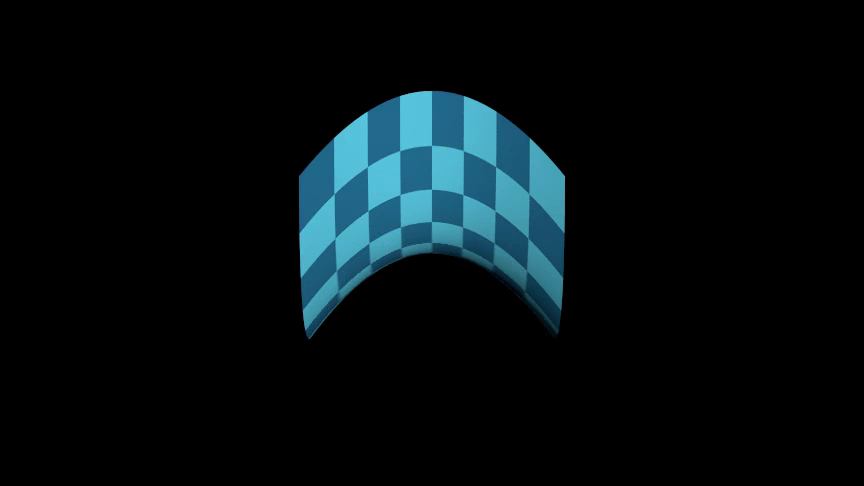
from algan import *
import torch

def saddle(uv):
    x = uv[..., :1] * 4 - 2
    y = uv[..., 1:] * 4 - 2
    return torch.cat((x, y, (x ** 2 - y ** 2) * 0.4), -1)

Surface(
    saddle, color_texture=get_checkerboard((BLUE, BLUE_E))
).rotate(60, RIGHT).spawn()

Scene.save_video()
Methods
Clear construction-time resolution entries for this exact class.
Map the surface's
(u, v)parameters to positions in space.Build many independently indexable surfaces without per-surface mobs.
Get the surface's parameter grid, the
(u, v)domain it is built from.Get the color a Surface uses when none was given.
Build the triangles the renderer draws this surface from.
Get where in the world each texel of this surface's texture maps sits.
Return one smooth unit normal for each sampled surface vertex.
Paint the surface in a checkerboard of alternating colors.
Color the surface by how far along one axis each point sits.
Color the surface by a function of its
(u, v)parameters.Paint an image across the surface.
Shape the surface by a function of its
(u, v)parameters.Reshape this surface into the shape of another one.
Attributes
animation_managerThis mob's scene-owned animation manager.
basisThe Mob's orientation and scale, as a flattened 3x3 matrix of shape
(*, 9).casts_shadowsWhether this Mob's geometry blocks light on its way from a light source to another surface -- whether it casts a shadow.
childrenThe Mobs attached below this one, in attachment order.
closed_shellWhether this Mob's triangles form a CLOSED shell -- every camera ray that enters the geometry crosses a second time on its way out.
An image painted across the surface, as an
[W, H, 5]RGBA+glow tensor.draws_descendantsWhether
get_render_primitivesreturns geometry belonging to this Mob's DESCENDANTS as well as its own.forwardGet the direction the Mob is facing.
How far this surface's mesh may sit from the exact shape, in world units.
lifespanThis mob's [spawn, despawn) interval on its Scene timeline (a
Lifespan).locationThe Mob's position in world space, shape
(*, 3).normalized_basisThe Mob's orientation with scale divided out, shape
(*, 9).parentsThe Mobs this one is attached to, in attachment order.
receives_shadowsWhether this Mob's surfaces are darkened by shadows cast onto them.
How far a drawn triangle may sit from the true surface, in pixels.
rightGet the Mob's own rightward direction.
scale_coefficientThe Mob's scale along its own right, up and forward axes, shape
(*, 3).two_sidedWhether this Mob's geometry should be lit from whichever side the ray arrives on.
upGet the Mob's own upward direction.
The surface's vertex positions, shape
(*, grid_width * grid_height, 3).xThe Mob's x coordinate in world units, shape
(*, 1).xyThe Mob's x and y coordinates in world units, shape
(*, 2).yThe Mob's y coordinate in world units, shape
(*, 1).zThe Mob's z coordinate in world units, shape
(*, 1).- classmethod clear_geometry_resolution_cache()[source]
Clear construction-time resolution entries for this exact class.
- property color_texture
An image painted across the surface, as an
[W, H, 5]RGBA+glow tensor.Assigning an image maps it over the surface’s parameter domain, so it follows the surface as it deforms.
Nonemeans the surface is drawn from its per-vertex colors instead. Assigning a texture whose resolution differs from the current one detaches history, since the two cannot be interpolated.Reading it back gives the image in that same
[W, H, 5]layout – not the flatW * H * 5row the timeline stores it as – so arithmetic on it can be assigned straight back:surface.color_texture = surface.color_texture * 0.5 # half brightness
The value is a
Color, one per texel, so the color API applies to a whole map at once:surface.color_texture = surface.color_texture.mult_opacity(0.5)
Its five channels are
(R, G, B, glow, alpha), which is why the plain multiplication above dims the alpha and the glow along with the color. Reach for one of them through.rgb,.glowor.opacityand assign the result back – the read is a copy, so writing into it alone changes nothing:texels = surface.color_texture texels.rgb = texels.rgb * 0.5 surface.color_texture = texels
On an axis where the surface closes on itself –
uon aSphere, both axes on aTorus– the image wraps: its last column of texels neighbours its first, each column spanning1 / Wof the way around, so a map whose edges join draws no seam. On an open axis the first and last texels sit on the two edges.Animation
An ordinary animatable attribute: assigning a new image is recorded as an animation, interpolating texel by texel from the old texture to the new one over the current context’s runtime (1 second by default). Assign inside
Off()to swap it instantly. The new image must match the current resolution to interpolate – see the note above about detaching history.
- coord_function(uv)[source]
Map the surface’s
(u, v)parameters to positions in space.This is what defines the surface’s shape, and what each 3-D shape class overrides:
Spheremaps the unit square onto a sphere,Torusonto a torus, and so on. The base implementation gives a flat plane spanning[-1, 1]on both axes.- Parameters:
uv (Tensor) – Parameter coordinates to map, shape
(*, 2), with both components in[0, 1].- Returns:
Positions relative to the surface’s location, shape
(*, 3).- Return type:
torch.Tensor
- classmethod from_batches(centers, *args, colors=None, **kwargs)[source]
Build many independently indexable surfaces without per-surface mobs.
One packed Mob covers every centre in
centers: it is a single Scene actor whose vertex grids are concatenated into one tensor, so the whole collection costs one construction and oneget_render_primitives()call per frame batch rather than one each. Index it (spheres[3]) for a view onto a single member, which shares the pack’s timeline rows.Every member has the same shape, resolution and material – only its centre and color vary. Anything else that differs needs separate Mobs.
- Parameters:
centers – World-space centre of each surface, shape
(N, 3)in world units. Any nested sequence is cast to a tensor and reshaped.colors – Per-member color, shape
(N, 3)as RGB,(N, 4)as RGBA or(N, 5)as Algan’s RGB+glow+opacity. Defaults to None, giving every member thecolorpassed inkwargs.*args – Passed to the ordinary constructor, which builds one representative member – so
radius,resolution,colorand the texture maps all mean what they usually do, and apply to the whole pack.**kwargs – Passed to the ordinary constructor, which builds one representative member – so
radius,resolution,colorand the texture maps all mean what they usually do, and apply to the whole pack.
- Returns:
The packed Mob, of whichever subclass this was called on.
- Return type:
Animation
Not animated: this only constructs. Animating the pack moves every member; animating
pack[i]moves just that one. All members share one lifespan, so they spawn and despawn together – stagger an entrance with opacity rather than with separate spawns.Examples
A lattice of spheres as one Mob:
Example: Example1SurfaceFromBatches 
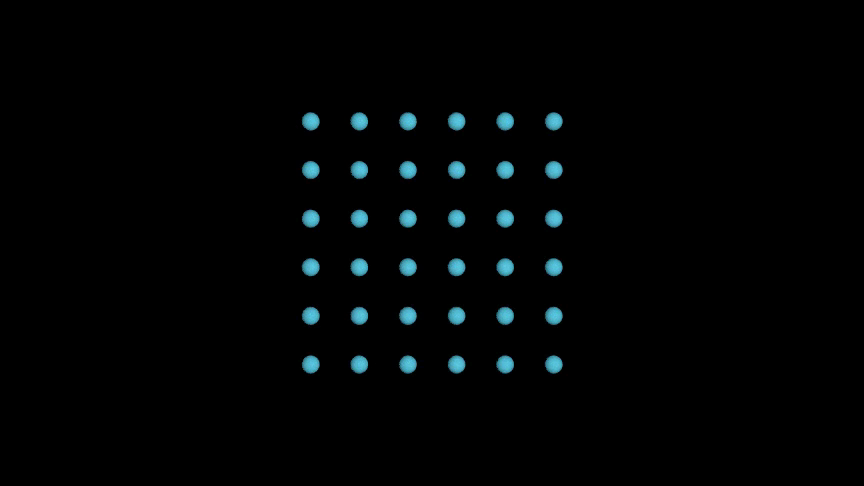
from algan import *
import torch

grid = torch.linspace(-2, 2, 6)
centers = torch.cartesian_prod(grid, grid, torch.zeros(1))
Sphere.from_batches(centers, radius=0.15, color=BLUE).spawn()

Scene.save_video()
- property geometry_tolerance: float
How far this surface’s mesh may sit from the exact shape, in world units.
Fixed when the surface is constructed – it is what chose the grid resolution – and read-only thereafter. Set it in the constructor to trade vertices against accuracy.
See also
render_tolerance_pixelsThe per-frame budget, in screen terms.
- get_base_grid()[source]
Get the surface’s parameter grid, the
(u, v)domain it is built from.Values run from 0 to 1 along both axes. This is the input the
set_*_by_functionmethods evaluate their functions over, so it is what to write those functions in terms of.- Returns:
The
(u, v)coordinates, shape[W, H, 2].- Return type:
torch.Tensor
- get_default_color()[source]
Get the color a Surface uses when none was given.
- Returns:
GREEN.- Return type:
- get_render_primitives()[source]
Build the triangles the renderer draws this surface from.
Called once per render batch. Vertex normals are computed from the grid unless
ignore_normalsis set, which is what makes a deformed surface light correctly without the author supplying normals.- Returns:
The surface’s triangles for every frame of the batch.
- Return type:
- get_texture_locations(resolution=None)[source]
Get where in the world each texel of this surface’s texture maps sits.
Textures are addressed in the surface’s own
(u, v)coordinates, which makes a map easy to write in terms of the surface’s parameters and awkward to write in terms of space. This is the bridge: it hands back the world position of every texel, laid out exactly like a texture map, so a map can be built from arithmetic on 3-D coordinates.xyz = surface.get_texture_locations() surface.color_texture = WHITE.mult_opacity(xyz[..., 1:2])
The positions are read from the surface’s current mesh, so they are right whether the shape came from its coordinate function, from a deformation, or from writing
surface.grid.locationyourself. They describe the surface now: a texture is carried in(u, v), so colors derived from world position travel with the surface when it later moves. Recompute them in anadd_updater()callback for a texture that stays locked to world space.Animation
A query, not a change: nothing is recorded and the surface is untouched. The positions are those of the surface’s current state, so call it after the transforms you want reflected in it.
- Parameters:
resolution (int | tuple[int, int] | None) – Texel counts
(W, H)alonguandv, or one int for a square map. Defaults toNone, meaning the resolution of the surface’s currentcolor_texture, or its grid resolution when it has no texture yet. Pass the resolution explicitly to build a map for one of the material texture arguments instead.- Returns:
World-space positions, shape
[W, H, 3]– the layoutcolor_texturetakes, one row per texel of the map that will be sampled there. Called where the surface’s state spans several frames (inside an updater), it keeps a leading frame axis,[F, W, H, 3].- Return type:
torch.Tensor
- Raises:
ValueError – If this is a packed surface built by
from_batches(), whose members share one texture and therefore have no single answer; if the grid has fewer than two points on an axis, so it has no triangles to sit on; or ifresolutionis not positive on both axes.
See also
get_base_grid()The
(u, v)domain these positions correspond to.set_color_by_function()Color the surface’s vertices by
(u, v)instead.
Examples
Paint a sphere’s northern half, cutting the boundary in world space rather than along a parameter line:
Example: Example1SurfaceGetTextureLocations 
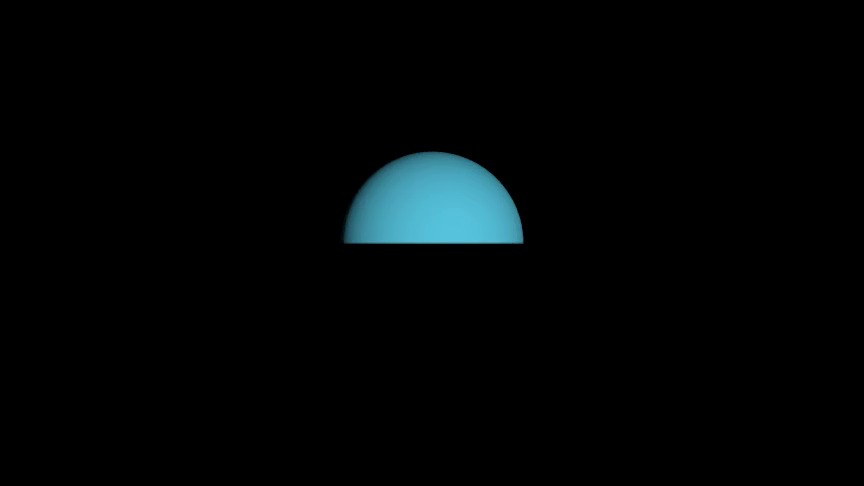
from algan import *

globe = Sphere(radius=1.5)
height = globe.get_texture_locations((128, 128))[..., 1:2]
globe.color_texture = BLUE.mult_opacity((height > 0).float())
globe.spawn()

Scene.save_video()
- get_unit_normals()[source]
Return one smooth unit normal for each sampled surface vertex.
Oriented the way the renderer orients them (outward, for the built-in shapes), because both go through
_reshape_grid_for_render(). The v axis that reorientation reverses is put back before flattening, so row i is still the normal ofgrid.location’s row i.
- property render_tolerance_pixels: float
How far a drawn triangle may sit from the true surface, in pixels.
The budget at the renderer’s reference frame height, scaled down in proportion on shorter frames. Fixed at construction and read-only. Unlike
geometry_toleranceit is spent afresh every frame, on whichever parts of the surface are near the camera.infwhen the surface declares no bound at all.
- set_checkerboard_colors(*colors, opacity=None)[source]
Paint the surface in a checkerboard of alternating colors.
Colors are assigned to grid vertices in rotation along both axes, so two colors give the usual checkerboard and three or more give diagonal stripes. The pattern is laid over the surface’s
(u, v)grid, so it follows the shape as it deforms, and its resolution is the grid’s – raisegrid_width/grid_heightfor finer squares.Animation
Recorded as an animation over the current context’s runtime (1 second by default): the vertices cross-fade to their new colors. Wrap the call in
Off()to apply it instantly.- Parameters:
*colors – Two or more colors to alternate between. Each is an Algan
Color, a named constant such asBLUE, or anythingColor()accepts. Passing none leaves the surface unchanged.opacity – Opacity to apply to the whole surface alongside the colors, from
0to1. Defaults toNone, leaving it as it is.
- Returns:
This surface, so calls can be chained.
- Return type:
See also
set_color_by_function()Color it by an arbitrary function of
(u, v).
Examples
Example: Example1SurfaceSetCheckerboardColors 
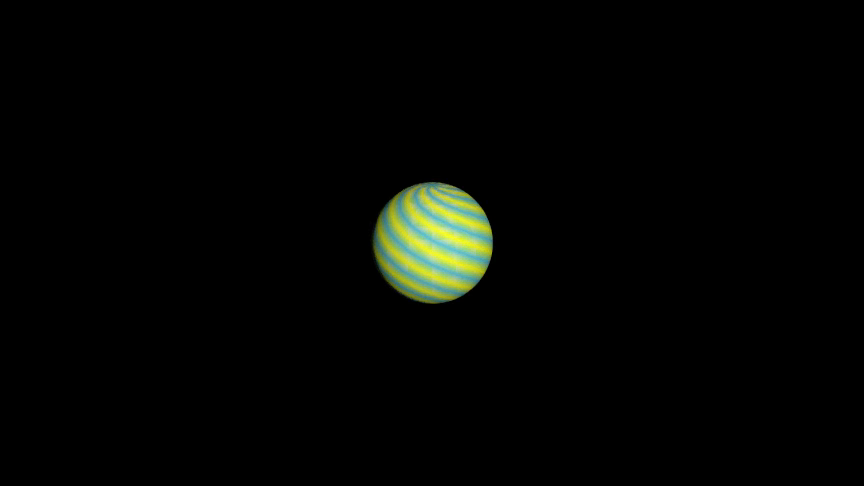
from algan import *

Sphere(grid_width=17, grid_height=17).set_checkerboard_colors(
    BLUE, YELLOW
).rotate(20, RIGHT).spawn()

Scene.save_video()
- set_color_by_axis(axes=None, colorscale=None, axis=2, **kwargs)[source]
Color the surface by how far along one axis each point sits.
The classic height map: low points take the first color of the scale, high points the last, and everything between is interpolated. Because the colors are assigned per grid vertex they travel with the surface, so a shape colored by height keeps those colors when it is later moved – recolor it in an updater if the map should stay locked to world space.
Animation
Recorded as an animation over the current context’s runtime (1 second by default), so the surface cross-fades into the new coloring. Wrap the call in
Off()to apply it instantly.- Parameters:
axes – A plot axes object supplying the value range to spread the scale over, read from its
x_range/y_range/z_range. Defaults toNone, meaning the range is taken from the surface’s own extent alongaxis.colorscale – The colors to interpolate between, either as a plain sequence (spread evenly over the range) or as
(color, value)pairs pinning each color to a coordinate. Defaults toNone, which leaves the surface unchanged.axis (int) – Which world axis the value is read along:
0for x,1for y,2for z. Defaults to2, colouring by height.
- Returns:
This surface, so calls can be chained.
- Return type:
- Raises:
ValueError – If an unrecognized keyword argument is passed.
See also
set_color_by_function()Color it by
(u, v)rather than by position.
Examples
Example: Example1SurfaceSetColorByAxis 
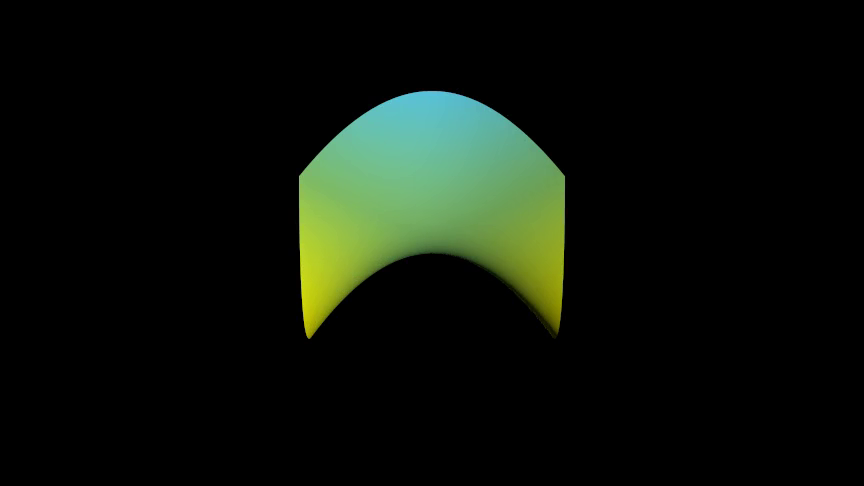
from algan import *
import torch

def saddle(uv):
    x = uv[..., :1] * 4 - 2
    y = uv[..., 1:] * 4 - 2
    return torch.cat((x, y, (x ** 2 - y ** 2) * 0.4), -1)

Surface(saddle).set_color_by_axis(
    colorscale=[BLUE, GREEN, YELLOW]
).rotate(60, RIGHT).spawn()

Scene.save_video()
- set_color_by_function(function)[source]
Color the surface by a function of its
(u, v)parameters.Gives each point of the grid its own color, for gradients, heat maps or anything where color carries data. The colors travel with the surface as it deforms.
Animation
Recorded as an animation over the current context’s runtime (1 second by default), so the colors cross-fade smoothly.
- Parameters:
function – Callable taking a
(u, v)tensor of shape[..., 2]and returning colors of shape[..., 3](RGB),[..., 4](RGBA) or[..., 5](RGB, glow, alpha – Algan’s internal channel order). Channels are in[0, 1]; a missing alpha defaults to 1 and a missing glow to 0. Must be vectorized over the whole grid.- Returns:
This surface, so calls can be chained.
- Return type:
See also
set_color_by_image()Paint an image on instead.
- set_color_by_image(rgba_array_or_file_path)[source]
Paint an image across the surface.
The image is mapped over the surface’s
(u, v)domain at its own resolution and sampled per fragment by the renderer, so it stays sharp however coarse the surface’s grid is, and it follows the surface as it deforms. This setscolor_texture, which you can assign directly when you already hold the image as a tensor.Animation
Recorded as an animation over the current context’s runtime (1 second by default): the surface cross-fades, texel by texel, to the image.
- Parameters:
rgba_array_or_file_path – Path to an image file, or an RGBA array. Paths resolve relative to the working directory and then the main script’s directory, so an image beside your script is found either way.
- Returns:
This surface, so calls can be chained.
- Return type:
See also
color_textureThe attribute this writes, for images already loaded as tensors.
- set_location_by_function(function)[source]
Shape the surface by a function of its
(u, v)parameters.The function maps each point of the parameter grid to a 3-D offset from the surface’s location, which is how a sphere, a torus or an arbitrary parametric surface is defined. Animating between two such shapes is what makes a surface morph.
Animation
Recorded as an animation: the grid points travel to their new positions over the current context’s runtime (1 second by default), so calling this on a spawned surface deforms it smoothly. Changing the grid resolution is a different matter – that needs
detach_history()first.- Parameters:
function – Callable taking a
(u, v)tensor of shape[..., 2]and returning offsets of shape[..., 3]. It must be vectorized – it is called once on the whole grid, not per point.- Returns:
This surface, so calls can be chained.
- Return type:
- set_shape_to(other_surface)[source]
Reshape this surface into the shape of another one.
Takes
other_surface’scoord_function()and applies it to this surface’s own grid, which is how one parametric shape morphs into another. Any grid axis coarser thanother_surface’s is refined to match first, so the target shape is not under-sampled. The other surface is left untouched.Animation
Recorded as an animation: this surface’s vertices travel to their new positions over the current context’s runtime (1 second by default). Wrap the call in
Off()to reshape instantly.- Parameters:
other_surface (Surface) – The surface whose shape to take.
- Returns:
This surface, so calls can be chained.
- Return type:
See also
set_location_by_function()Shape it by a function you write.
become()Morph into a Mob of any kind, not just another Surface.
- property vertices: Tensor
The surface’s vertex positions, shape
(*, grid_width * grid_height, 3).Shorthand for
surface.grid.location: the live tensor the renderer tessellates from, laid out row-major over thegrid_heightxgrid_widthsample grid. Writing it moves the surface’s vertices, which is the lowest-level way to deform a shape –set_location_by_function()is the usual one. Reach forgriditself when you want the vertices’ colors (grid.color) rather than their positions.The assigned value must carry the same number of vertices the surface already has: the grid resolution is chosen once, at construction, and nothing here can change it. Positions are absolute, in world units, not offsets from the surface’s location.
Animation
Assignment is recorded, so the vertices travel to their new positions over the current context’s runtime (1 second by default). Wrap the write in
Off()to move them instantly.